
Service · AI Training Day · Portland, Montréal or remote
Hands-on AI training for your whole team, in one day.
The morning gets everyone past the chatbot. The afternoon builds one real workflow per team, on work that team already owns. Everyone leaves with it running, and ten days later we check that it still is.
Length
One day, about seven hours
Room
10 to 40 people
Where
Portland · Montréal · video call
Price
One flat rate for the room
Judged
Ten days later, on what stuck
What the day installs, in nine seconds: a brief spoken out loud, the files read, a draft written, nothing sent.
The problem
Why most AI training changes nothing.
Most AI training is a slideshow, and Tuesday looks the same as Monday. Here every laptop stays open all day, everyone uses AI on something real before lunch, and the day is judged ten days later on whether the workflow is still in use.
1
day for a whole team to leave with a workflow running, not a folder to read later
The day
Two acts. One day.
The morning is for the whole room. The afternoon is for each team, one at a time. About seven hours, including lunch.
Act one · Morning · the whole room
Everyone gets past the chatbot.
20 min
Name the work that eats the week
Every person says one task they repeat, out loud. That list is the raw material for the rest of the day.
45 min
A new hire, not a search bar
Ask first: could an AI do this? Then brief it the way you would brief a sharp new colleague, and correct it until it gets it right. It keeps what it learns.
45 min
Talk, don't type
Everyone sets up dictation and briefs their AI out loud for the first time. It's faster than typing, and it's how the studio runs every day.
60 min
Package what you repeat
Skills: what they are, how to use one, how to write your own. The room ships one small working tool together, live, before lunch.
Then lunch. The room splits.
Act two · Afternoon · team by team
Each team builds the thing it needs.
60 min
Team A builds its workflow with Alex
One table, one task the team already does every week. Name it, build the workflow live, set the rule that keeps a person in the loop, leave it running.
60 min
Team B builds its workflow with Alex
Same shape, different table. For example: finance, operations and marketing. Yours get scoped on the call.
60 min
Team C builds its workflow with Alex
By the third hour the first two teams are already running theirs.
20 min
Make it yours
Every person writes one rule of their own into their guardrails file, in their own words: what the AI may do alone, what it must always ask about.
15 min
Close, with the check-in booked
The team's shared page is drafted, every person's first-week plan is in their own system, and the ten-day check-in goes in the calendar before anyone leaves the room.
About seven hours including lunch, usually 9 to 4. For example: finance, operations and marketing. Yours get scoped on the call.
→
The guardrails get demonstrated before anyone connects anything real. Every person watches the AI refuse to send something on its own, then sets the rule that keeps it that way.
What you learn and build
Five habits before lunch, and the system each person keeps.
Every person learns the same five habits and installs their own working system. One assistant per person, that they own. Nothing that needs an engineer.

01 · Morning
Ask first
Name a task you repeat, break it into steps out loud, and decide which steps a machine could take.

02 · Morning
A new hire, not a search bar
Give it context and correct it. It keeps what you correct.

03 · Morning
Talk, don’t type
Set up dictation and brief the AI out loud. It's faster than typing, and it's how the studio runs every day.

04 · Morning
Package what you repeat
What a skill is, how to run one, and how to write your own, so the AI does the task the same way every time.

05 · Afternoon
Draw the line
Decide, in writing, what the AI may do on its own and what it must always ask about first.

By lunch
One tool the whole room built
Live, together, before anyone eats. Then the room splits into its teams.
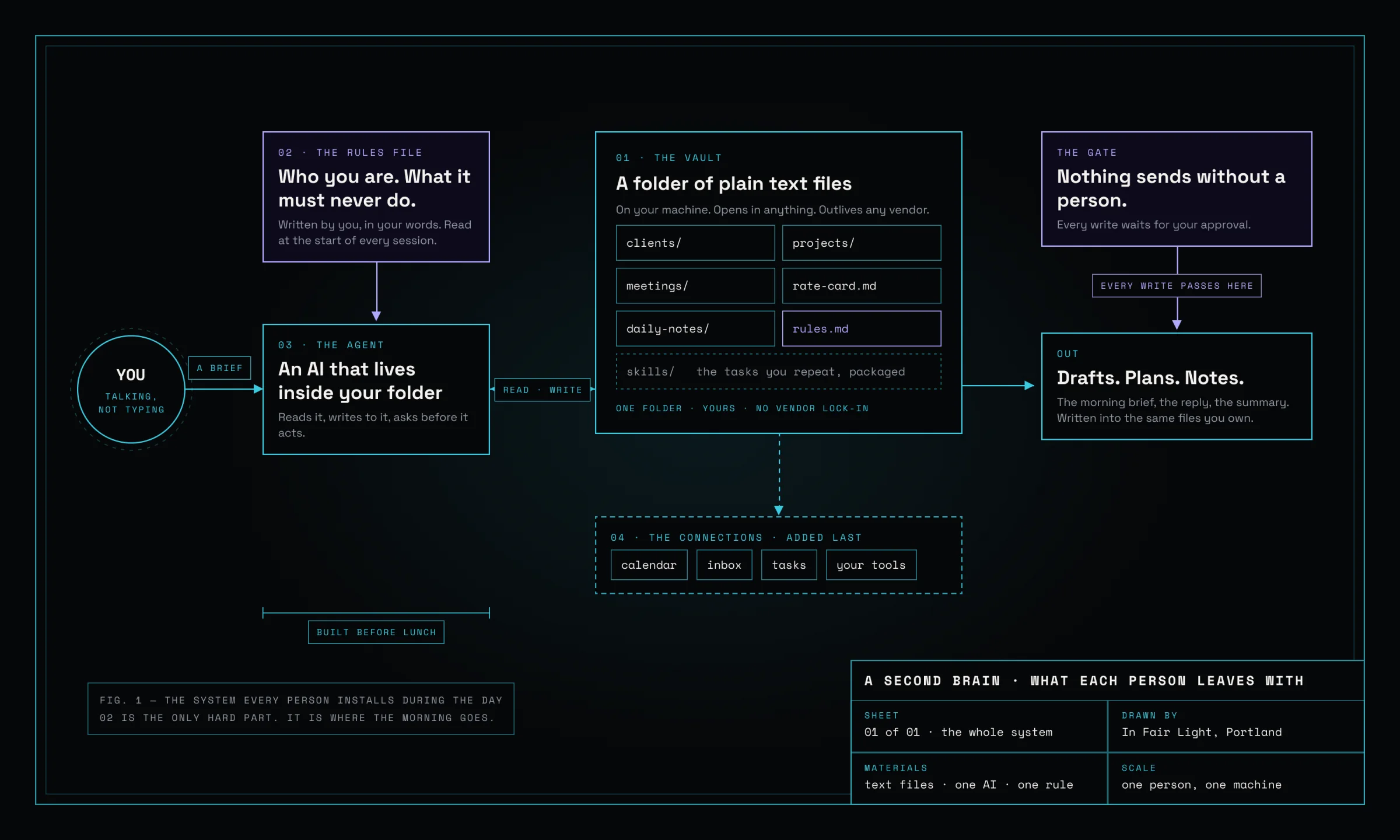
Fig. 1 · The system each person installs during the day: plain text files on their own machine, one AI inside them, one rule that keeps a person in the loop.
Who teaches it
Taught by someone who runs a company on it.
Alexandre Chaput runs his studio on the same kind of system he teaches: an AI that holds the studio’s clients, notes, calendar and drafts, and that he talks to more than he types to.
The training day is that system, taught to a room. No certificate, no deck.
More about Alex →
Who it helps most
Built for marketing, creative and operations teams.
The afternoon works on whatever your teams repeat. Three workflows a team can build in its hour.

Marketing and creative
A campaign brief becomes first drafts in the brand’s voice, with the AI reading the last three campaigns before it writes a word.

Operations
The weekly report assembles itself from the tools the team already runs, and a person reads it before anyone else does.

Finance and admin
A revised quote drafted from last month’s quote and the rate card. Sent by a person, never by the AI.
Who it's for
Ten to forty people, with the person who signs off in the room.
Built for teams that already suspect AI should be doing more for them, and want it running rather than talked about.
A good fit if
✓
You know AI should be saving you hours by now, and it isn’t. You have the tools. What you’re missing is the system and the habit.
✓
You and your team are buried in tasks, threads, documents and meetings, and you want a way to stay on top of it that doesn’t depend on memory or willpower.
✓
You want what an executive assistant gives a CEO, for every person on the team: a briefing in the morning, drafts ready by noon, nothing dropped. Ready before you are.
✓
You want a notetaker that remembers everything you have ever told it, reads your files before it answers, and never has to be reminded twice.
✓
A team, department or division of ten to forty, with the person who signs off in the room and a laptop open.
Not the right shape if
–
You are a team of one or two. The one-on-one install is the right size, and it already exists.
–
You want a keynote, a certificate or a deck to file. Nothing here is delivered from a stage.
–
You want one shared brain the whole company edits. That is a different and harder job, and we say so.
After the day
Built to survive the following Monday.
What lands by lunch, by the end of the day, and ten days later.
By lunch
One tool the whole room built
Live, together, on a task someone in the room named that morning.
By the end of the day
One workflow per team, running
On the team’s own machines. Plus a shared page of house rules, and a first-week plan sitting in each person’s own system.

Ten days later
One check-in call, included
What is still in use, what got stuck, what to change. It is also how the day gets judged.
Tech stack and compatibility
Runs on the tools you already pay for.
Before the day, you tell us which assistant your company pays for and which tools your team already runs. The day is built on those. There is nothing to buy from us.
The assistant · pick the one you have
 Claude
 ChatGPT
 Gemini
The system each person keeps
 Obsidian
What it can read from, with your say-so
 Google Calendar
 Gmail
Gmail Asana
Asana Slack
SlackOne assistant per person, not a company brain
Each person leaves with their own system, on their own machine, that they own and can trust. The company benefits because every person does more. We don’t install a shared brain that everyone edits; that’s a different and harder job.
Nothing proprietary, nothing locked in
Every file is plain text. If the notes app vanished tomorrow the folder would be fine, and if the assistant changes, you point the new one at the same folder. If your company standardises on a different tool, we confirm it before the day.
The details
Where, how long, what to bring, what it costs.
Where
On site in the Portland, Oregon area or greater Montréal. One continuous video call anywhere else.
Length
One day, about seven hours including lunch. Not a series of sessions.
Room
One table per team for the afternoon.
Language
English or French, depending on the team.
Bring
Your own laptop and a paid plan on the AI tool your company uses. A pre-day checklist covers installs, so nobody spends the morning watching a progress bar.
Price
One flat rate for the whole room. No per-seat fees, no licenses to buy from us, travel at cost outside Portland and Montréal. The number comes on the 20-minute scoping call.
Smaller
A team of one or two? The one-on-one install is the smaller rung, and it is the same method.
Questions
The questions people ask before they book.
This looks complicated for people who aren’t technical.
Nobody reads documentation. They watch it work, then do it, with someone in the room to unstick them.
Will it start sending emails or touching files on its own?
No. The first thing every person sets up is a rule that the AI drafts and never sends. They test it themselves, ask it to send something, and watch it hand back a draft instead. Every write needs a person to approve it.
We already pay for ChatGPT, Claude or Copilot. Is a training day still worth it?
Having the tool was never the gap. Most teams that pay for one still use it like a search bar: one question, one answer, no memory of yesterday. The day builds the habit and the system around the tool you already have, and makes sure it belongs to you.
We already did an AI training and nothing changed.
Usually because a seminar hands over information, and information doesn't build a habit. Here everyone works on their own laptop, on their own work, and the day is judged ten days later on whether the workflow is still in use.
How much does a one-day AI training for a team cost?
One flat rate for the whole room. No per-seat fees, no licenses to buy from us, travel at cost outside Portland and Montréal. The number, the per-head math and what it includes come on the 20-minute scoping call, along with an honest answer on whether a day is the right shape for you.
How long should AI training for employees take?
One day, plus a check-in ten days later. A ninety-minute webinar transfers information. A day with every laptop open builds a habit on real work, and the check-in is where it gets judged.
Do you train on ChatGPT, Claude or Gemini?
Any of them. The habits are the same; the tool is whichever your company already pays for. Alex runs his own studio on Claude. Which one, and who already has a seat, gets confirmed on the scoping call.
Is our data safe during the workshop?
Everything stays in plain text files on your own machines, and anything new gets connected read-only first. Nothing is uploaded to In Fair Light. The AI never sends or changes anything without a person approving it, and the only AI service your data touches is the plan your company already uses.
Do you deliver in French, and in Montréal?
Yes. On site in greater Montréal or the Portland, Oregon area, in English or French, and over one continuous video call anywhere else.
Who owns what gets built?
Each person owns their own system, entirely. It lives in plain text files on their machine, not inside a vendor’s chat history. If the tool changes or a subscription lapses, the files still open and the system still works.
Get in touch
Tell us about your team.
Tell us how many people, which teams, and what you’d want AI doing for them. We’ll tell you whether one day is the right size.